TS Ration Card Download Online with Aadhaar & FSC Number (2026)
Looking for a simple way to complete your TS Ration Card Download online? Residents of Telangana can now download their Food Security Card (FSC) PDF through the official EPDS Telangana portal using an Aadhaar number, FSC reference number, or ration card number.
The online ration card system managed by the Telangana Civil Supplies Department helps eligible families access subsidized food grains and government welfare benefits under the Public Distribution System (PDS). This guide explains how to download your ration card, check FSC status, search beneficiary details, fix common issues, and understand eligibility requirements.
Whether you are applying for a new card, checking an application, or downloading an approved ration card PDF, this page covers every important step in one place.
Disclaimer
This website is an independent informational platform and is not affiliated with the Government of Telangana or the Telangana Civil Supplies Department.
For official announcements, applications, and updates, users should always refer to the EPDS Telangana portal.
Quick Access Services
- TS Ration Card Download
- FSC Search Telangana
- Telangana Ration Card Status Check
- Rejected FSC Status Search
- FSC Application Status
- Ration Card PDF Download
TS Ration Card Download – Step-by-Step Process
You can download your Telangana ration card online within a few minutes by following the official EPDS Telangana process.
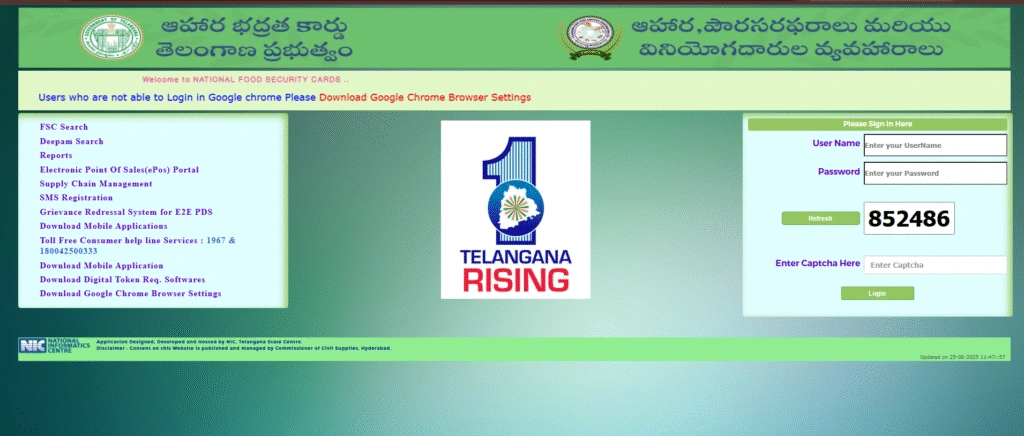
Step 1: Visit the Official EPDS Telangana Portal
Open the official EPDS Telangana website in your browser.
The portal is operated under the Government of Telangana for digital ration card services and food security management.
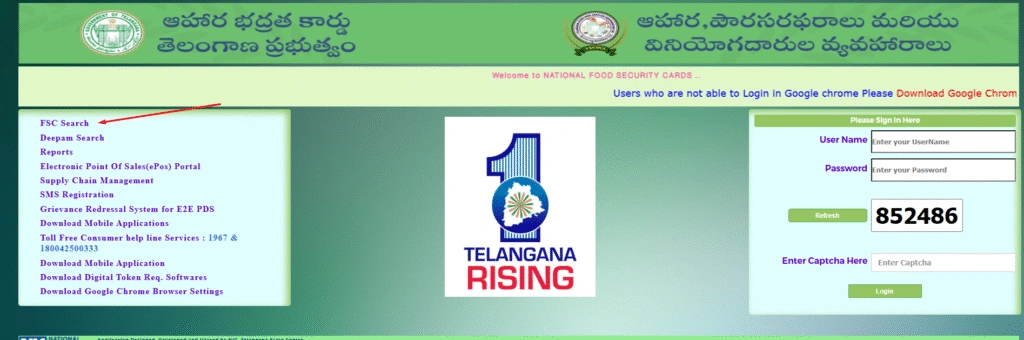
Step 2: Select “FSC Search”
On the homepage, click on the “FSC Search” option available under ration card services.
This section allows users to:
- search ration card details,
- verify beneficiary information,
- and download ration card PDFs.
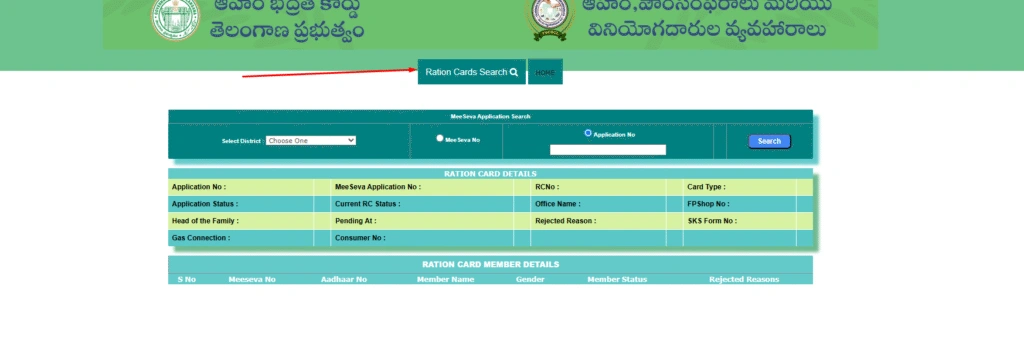
Step 3: Choose Search Method
You can search ration card details using:
- FSC Reference Number
- Ration Card Number
- Aadhaar Number
- District, Mandal, and Village
Choose the method most convenient for you.
Step 4: Enter Required Information
Provide accurate details, including:
- Aadhaar number,
- FSC number,
- or ration card number.
Incorrect information may prevent the system from displaying your ration card details.
Step 5: View Beneficiary Information
After submitting the details, the system displays:
- head of family name,
- ration card category,
- family member details,
- and current FSC status.
Step 6: Download the TS Ration Card PDF
Click on:
- “Download FSC”
- or “Print FSC.”
To save the Telangana ration card PDF on your device.
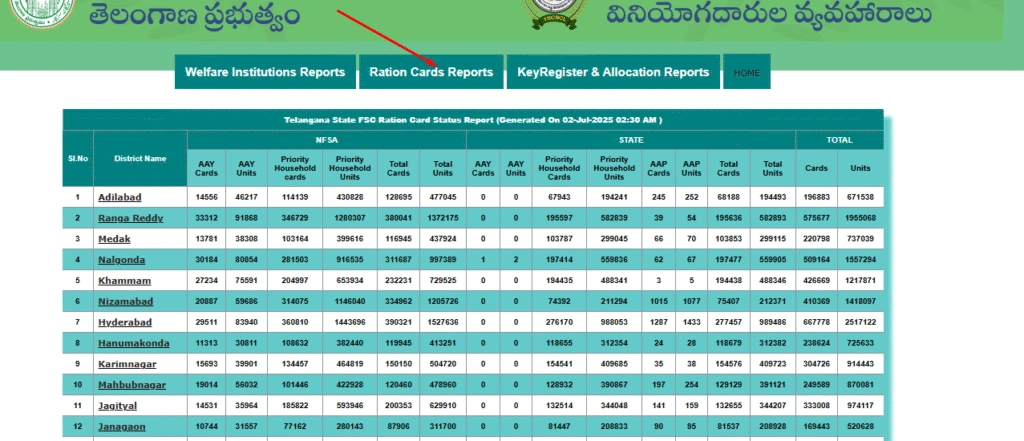
Users can also print a physical copy for Fair Price Shop verification and government scheme usage.
FSC Search Telangana
The FSC Search Telangana feature helps citizens verify ration card information online without visiting any government office.
The online FSC search system allows residents to:
- Check ration card details,
- confirm Aadhaar linkage,
- verify family member information,
- and view application status.
This service is especially useful for users who:
- lost their physical ration card,
- forgot their FSC number,
- or need a digital copy urgently.
1: FSC Search Using Aadhaar Number
Residents can search ration card details using Aadhaar if the number is linked with the Food Security Card.
Steps:
- Open the EPDS Telangana portal
- Click on FSC Search
- Select Aadhaar Search
- Enter Aadhaar number
- Submit details
The system will display linked ration card information instantly.
2: FSC Search Using Ration Card Number
If you already know your ration card number, this method is simple and fast.
Required Details:
- Existing ration card number
- Registered district information
This option helps users directly access and download their FSC details.
3: FSC Search by District, Mandal & Village
Users without an Aadhaar or an FSC number can search beneficiary information manually.
Required Details:
- District
- Mandal
- Village
- Fair Price Shop details
This method is commonly used for:
- beneficiary verification,
- village-wise ration card lists,
- and local record checking.
Telangana Ration Card Status Check
The Telangana ration card status feature allows applicants to track approval progress online.
Applicants can verify whether their application is:
- Approved
- Pending
- Rejected
- Under Verification
Steps to Check TS Ration Card Status
Step 1:
Visit the EPDS Telangana portal.
Step 2:
Click on “FSC Application Search”.
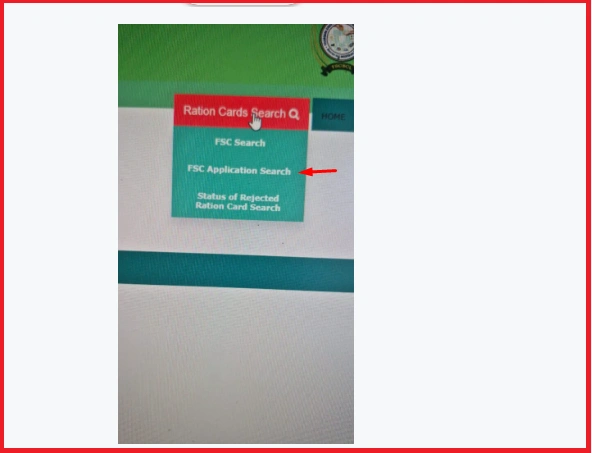
Step 3:
Enter:
- Application Number,
- MeeSeva Reference Number,
- Aadhaar Number,
- or FSC Number.
Step 4:
Click on “Search”.
Step 5:
View your latest ration card status.
The portal may also display:
- verification progress,
- rejection reasons,
- and approval updates.
Download TS Ration Card with Aadhaar Number
The Aadhaar-based ration card download option is one of the most commonly used methods on EPDS Telangana.
This method works when:
- Aadhaar is linked correctly,
- beneficiary records are updated,
- and the application is approved.
Steps to Download with Aadhaar
- Open the EPDS Telangana portal
- Select FSC Search
- Choose Aadhaar Search
- Enter Aadhaar number
- Verify details
- Download the ration card PDF
Applicants facing Aadhaar mismatch issues should visit a nearby MeeSeva center for correction.
Download TS Ration Card with FSC Number
The FSC reference number is issued during the ration card application and approval.
Users can download their ration card directly using this reference number.
Benefits of FSC Search:
- Faster search process
- Accurate beneficiary matching
- Easy application tracking
Always keep your FSC reference number saved for future access.
Rejected FSC Status Search
EPDS Telangana also allows users to check rejected ration card applications online.
Applicants can verify:
- rejection reasons,
- missing document issues,
- Aadhaar mismatch errors
- and eligibility problems.
Common Reasons for Rejection
Aadhaar Not Linked
Applications may fail if Aadhaar verification is incomplete.
Duplicate Ration Card
Applicants holding multiple cards may face rejection.
Income Eligibility Issues
Applications exceeding prescribed income limits may not qualify.
Incorrect Family Details
Mismatched names, addresses, or family information may delay approval.
How to Fix Rejected Applications
Step 1:
Check the rejection reason online.
Step 2:
Correct the issue through MeeSeva or the local civil supplies office.
Step 3:
Submit supporting documents.
Step 4:
Track updated status regularly.
What is EPDS Telangana?
EPDS Telangana stands for Electronic Public Distribution System Telangana.
It is a digital food distribution platform developed for:
- ration card management,
- beneficiary verification,
- food grain allocation,
- and subsidy transparency.
The portal simplifies access to:
- Food Security Cards,
- ration card services,
- and welfare schemes for eligible residents.
The digital system improves:
- transparency,
- accountability,
- and faster public service delivery.
Types of Telangana Ration Cards
The Telangana government issues different ration cards depending on income level and eligibility.
1: Food Security Card (FSC)
The most common ration card category for economically weaker families.
Eligible beneficiaries receive subsidized food grains monthly.
2: Antyodaya Anna Yojana (AAY)
Issued to the poorest households, including:
- elderly citizens,
- widows,
- disabled individuals,
- and vulnerable families.
3: Priority Household (PHH)
Provided to low-income households under the National Food Security Act guidelines.
Telangana Ration Card Eligibility Criteria 2026
Applicants must satisfy the following conditions:
- Must be a permanent resident of Telangana
- Family income should fall within prescribed limits
- Aadhaar linkage is required
- Applicant should not hold another ration card
- Priority given to economically weaker families
Income Limits
Rural Families:
Annual income should generally remain below the prescribed state limits.
Urban Families:
Separate income eligibility applies to urban households.
Eligibility verification is conducted by local authorities before approval.
Documents Required for TS Ration Card
Applicants may need the following documents:
- Aadhaar card
- Residence proof
- Income certificate
- Passport-size photographs
- Existing ration card (if applicable)
- Mobile number
Correct document submission helps avoid application delays.
Common Problems During TS Ration Card Download
Many users face technical or verification issues while using EPDS Telangana.
1: FSC Number Not Found
Solution:
- Recheck the number carefully
- Use Aadhaar search instead
- Verify approval status
2: Aadhaar Search Not Working
Solution:
- Ensure Aadhaar is linked
- Try again later
- Clear browser cache
3: Application Not Found
Solution:
Applications under field verification may take time to appear online.
Users should wait for local approval to be processed.
4: Inactive or Dormant Card
Solution:
Visit the nearby ration shop or MeeSeva center for activation.
5: Website Loading Issues
Solution:
- Use an updated browser
- Try during non-peak hours
- Use a stable internet connection
Benefits of Telangana Ration Card
The Telangana ration card helps eligible families receive several benefits.
Subsidized Food Grains
Beneficiaries receive:
- rice,
- wheat,
- sugar,
- and essential commodities at reduced prices.
Access to Welfare Schemes
Ration card holders may become eligible for:
- housing schemes,
- pension programs,
- financial assistance schemes,
- and state welfare initiatives.
Identity & Residence Proof
The ration card also serves as:
- address proof,
- family identity proof,
- and supporting documentation for applications.
MeeSeva and EPDS Telangana Services
MeeSeva centers help citizens access ration card services offline.
Users can visit MeeSeva centers for:
- Aadhaar correction,
- member addition/removal,
- application submission,
- and grievance support.
MeeSeva centers are useful for applicants facing online issues.